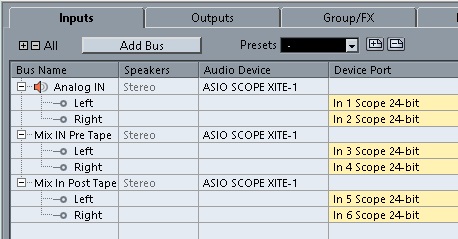
First, setup three stereo
inputs as shown on the right:
-
Analog IN. This is
per any standard tracking project where you
might record analog inputs from your Scope
converters such as guitar or vocal performances.
-
Mix IN Pre Tape. This
is to receive the mix output (it may already be
a mastered version with OptiMaster processing
etc) from Scope.
-
Mix IN Post Tape.
This is to receive the final output from Scope
after the Magneto processing has been passed
back to Scope for monitoring and adjustments.
|
|
 |
| |
|
|
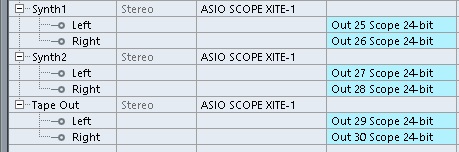
Now add an additional output to
your Cubase project:
- This output is the
one that sends the Magneto processed signal back
to Scope for monitoring.
|
|
 |
| |
|
|
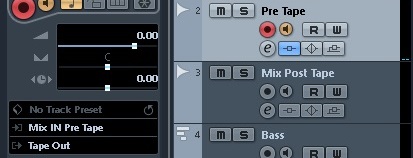
Set up a 'Pre-Tape' track in
Cubase.
-
Add the Magneto as an
insert on the 'Pre Tape' channel.
-
Set the track input to 'Mix
IN Pre Tape'.
-
Set the track output to
'Tape Out'.
-
Select the small speaker
(monitoring) icon so that it is ON (orange).
|
|
 |
| |
|
|
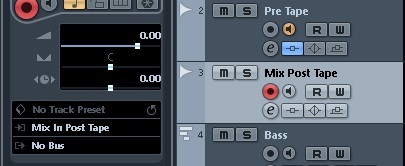
Set up a 'Mix Post Tape' track
in Cubase. This is the track used for
recording your final mixdown.
-
Set the track input to 'Mix
IN Post Tape'.
-
Set the track output to 'No
Bus'.
-
Select the small speaker
(monitoring) icon so that it is OFF.
|
|
 |